


Powerful, scalable, and versatile
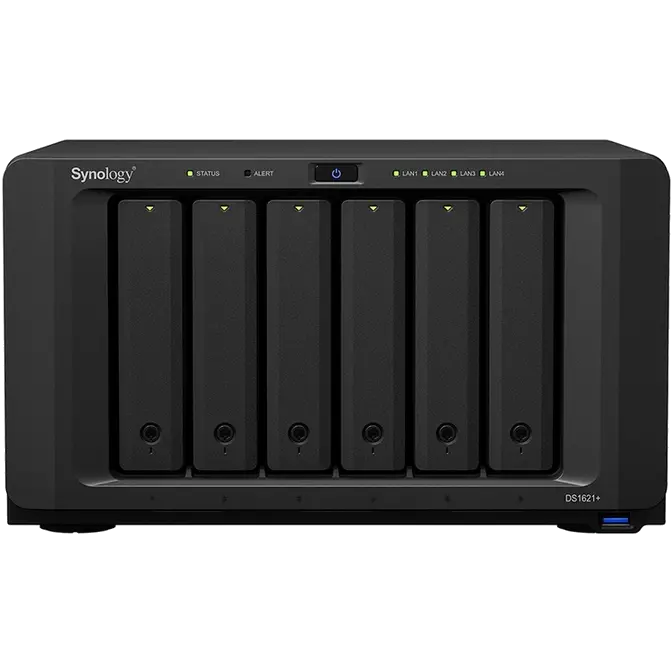
Synology DS1621+ is a powerful and compact 6-bay network attached storage solution designed to store and protect critical data assets. Today’s growing amount of unstructured data requires smarter and increasingly higher performance methods of storing, accessing, and collaborating. Designed for scalability, the DS1621+ enables you to start small, then expand as your data grows.

CPU
AMD Ryzen™
Quad-core 2.2 GHz

Cache Acceleration
Dual M.2 2280 slots for NVMe Cache

Performance
110K, 174% higher 4K random read IOPS1

Scalability
Expand up to 16 drives with two DX517 expansion units
Faster than ever
Compared to its predecessor, DS1621+ is faster in just about everything. Get things done quicker through Synology Drive and streamline photo management with Synology Moments.1
Synology Drive Moments Web server Transfer Performance
DS1621+
Predecessor
47.01%
faster in file indexing
DS1621+
Predecessor
49.13%
faster in photo indexing
DS1621+
Predecessor
174%
faster PHP response
DS1621+
Predecessor
273%
faster random IOPS
Turbocharge and expand it
Upgrade your DS1621+ to match your data requirements, whether it is for faster networking or for higher storage capacity.
-
2 x M.2 NVMe
Enable ultra-fast NVMe cache to accelerate HDD arrays by 20X or more
-
10GbE support
Add in faster SFP+ or RJ-45 networking to turbocharge existing workflows
-
Storage Expansion
Supports two DX517 expansion units for a total of 16 bays
HDD/SSDs, 10GbE network adapter cards, and expansion units are sold separately.



Ultimate file management and sharing
File Station is a web-based, fast and secure management tool built to allow easy, drag-and-drop operations without requiring any complex setup on Mac or PC. Advanced search and filtering tools allow for easy organization and file sharing. For complete compatibility, DS1621+ supports the following protocols: AFP, FTP, iSCSI, NFS, SMB, and WebDAV.

Fully certified storage virtualization solutions
Synology iSCSI storage fully supports most virtualization solutions to enhance work efficiency with easy management interface. VMware vSphere 6 and VAAI integration helps offload storage operations and optimizes computation efficiency. Windows Offloaded Data Transfer (ODX) speeds up data transfer and migration rate. OpenStack Cinder support turns your Synology NAS into a block-based storage component.




Ultimate Backup Solution
DS1621+ integrates various backup applications into an intuitive user interface, offering durable storage technologies to safeguard your valuable data on any device.

Active Backup for Business
Centralize backup tasks for VMware, Windows, and file servers. Restore whatever you want fast and reliably when needed.
Learn more

Hyper Backup
Comprehensively back up your data to a local shared folder, an external device, another Synology NAS, an rsync server, or a public cloud to ensure data safety.
Learn more

Synology Drive
Safeguard your computer with Synology Drive Client. Effortlessly perform real-time data backups and point-in-time file recovery.
Learn more

Active Backup for
Microsoft 365 / G Suite
On-premise backup solution with a centralized dashboard. Optimize storage efficiency with single instancing and block-level deduplication technology.
Microsoft 365G Suite
Powered by Synology DSM
Central Management System
Manage multiple Synology NAS servers simultaneously on a centralized interface to increase business efficiency.
Synology MailPlus
Secure, reliable, and private mail server solution with an intuitive and modern mail client.
Synology High Availability
Seamless transition between clustered servers in the event of a server failure to minimize the impact on applications.
Security
Comprehensive built-in security tools are constantly updated to protect your devices against evolving threats.
Synology Drive
A versatile solution for file management and synchronization.
Surveillance Station
Complete surveillance solution for recording, monitoring, and management.
Works best with Synology solid-state drives
Engineered to handle intensive 24/7 workloads, Synology SSDs are designed to provide consistent high-performance.



- 1Status indicator
- 2Alert indicator
- 3Power button and indicator
- 4LAN indicator
- 5Drive status indicator
- 6Drive tray
- 7Drive tray lock
- 8USB 3.2 Gen 1 port
- 9System fan
- 10Power port
- 11Kensington Security Slot
- 121GbE RJ-45 port
- 13Reset button
- 14Expansion port
- 15PCIe expansion slot