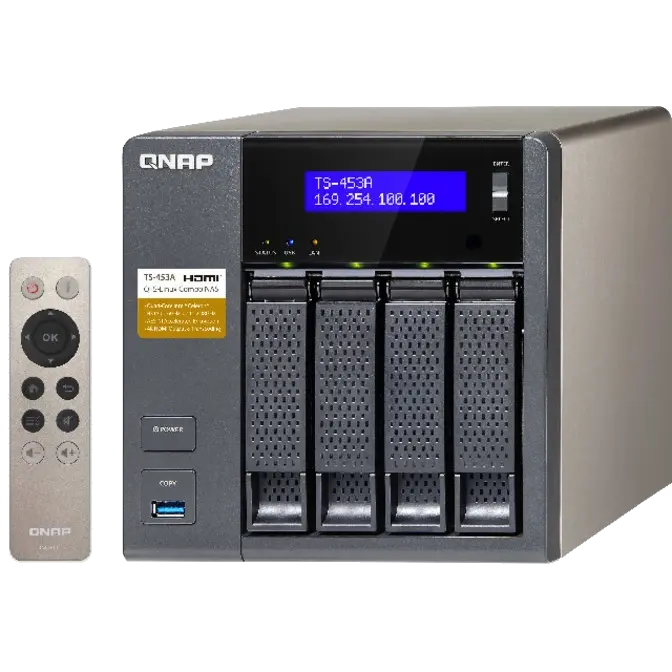
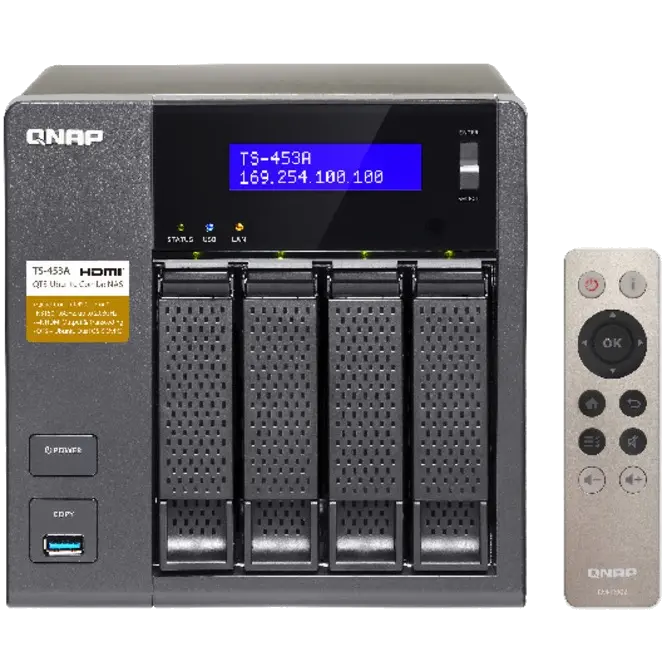



In response to the coming era of Internet of Things (IoT), the TS-453A innovatively supports the open-source Linux® platform as a gateway for IoT solutions to other smart devices. The TS-453A allows users to directly utilize various feature-rich Linux apps, enjoying a private cloud combining storage and IoT applications, and professional developers can develop and run IoT applications directly on the TS-453A. The secure, reliable TS-453A is packed with business-critical features such as Volume/LUN Snapshot – allowing files/folders to revert to a previous state in case of any corruption or file-loss. The TS-453A is powered by the latest quad-core Intel® Celeron® processor which allows users to enjoy 4K (H.264) video playback and 1080p/4K video real-time transcoding directly from the TS-453A to an HD/4K display.
- Supports the Linux® OS with direct output via HDMI
- Dual HDMI output for switching between duplicated and extended desktop options
- AES-NI hardware-accelerated encryption for efficient cryptographic performance up to 412 MB/s
- Supports 4K hardware decoding and transcodes 4K H.264 videos on-the-fly or offline
- Quickly find files using a real-time, natural search with Qsirch 2.1
- NAS and iSCSI-SAN unified storage solution for virtualization
- Supports VMware®, Citrix®, Microsoft® Hyper-V and advanced virtualization features
- A hybrid approach to virtualization in one NAS: Virtualization Station & Container Station
- Build a personal karaoke system with high-quality audio output with the new OceanKTV app
QTS-Linux dual systems, geared for the IoT era
The TS-453A’s QTS-Linux dual systems are based upon QNAP’s advanced virtualization technologies. The revolutionary architecture of the TS-453A enables users not only to download rich apps from QTS App Center but also to develop or utilize IoT packages for Linux® and display them using HDMI output. With the TS-453A, you can develop and install various IoT packages on demand and centrally store the data on the TS-453A, benefiting from a secure private storage and development solution. Simply plug in a keyboard, mouse and HDMI monitor to the TS-453A, and use the Linux Station as if you were using a PC*. You can also operate the Linux Station as a remote desktop via web browser for instant management**.
* To use the Linux Station, you must install it from the App Center.
** The remote desktop function does not support remote audio output
Intel® Celeron® quad-core 1.6GHz CPU fulfills multi-tasking efficiency
Powered by the latest 14 nm Intel® Celeron® N3150/N3160 quad-core 1.6GHz processor, dual-channel 4/8GB DDR3L-1600 RAM (upgradable to 8GB), 4 Gigabit LAN ports and SATA 6Gb/s, the TS-453A delivers up to 414 MB/s read speed and runs tasks smoothly and quickly. The TS-453A can automatically increase the processor's clock speed from 1.6GHz to 2.08GHz when performing CPU-intensive tasks. The TS-453A features Intel® AES-NI hardware-accelerated encryption engine to drive transfer speeds of up to 412 MB/s with AES 256-bit encryption for both full NAS volume and shared folders, boosting system performance & security while ensuring the safety of sensitive business data stored in the TS-453A.
Tested in QNAP Labs. Figures may vary by environment.
Test Environment:
NAS:
OS: QTS 4.2.0
Volume type: RAID 5; 4 x Seagate 1TB ST1000NM0033 HDDs: NAS and PCs are connected.
Client PCs:
Intel® Core™ i7-4770 3.40GHz CPU; DDR3L 1600Hz 16GB; WD 1TB WD10EZEX;
Intel Gigabit CT( MTU 1500 ) ; Windows® 7 Professional 64bit SP1 & Windows 8.1 Pro 64-bit IOMeter configuration: Multiple PCs via switch. Transferring 32GB file continuously to NAS for 3 minutes. Block size: 64KB for SMB2.0
Superior real-time and offline 4K video transcoding*
Featuring advanced 8th-generation Intel® HD Graphics, the TS-453A supports 4K (H.264) hardware decoding and delivers superior real-time 4K (H.264) and 1080p video transcoding to convert videos to universal formats that can be smoothly played on PCs, mobile devices and Smart TVs. With offline transcoding, even when you can only connect using a low-speed Internet connection, you can still enjoy smooth video playback via File Station, Video Station, and the Qfile mobile app by selecting a pre-rendered lower resolution video. The TS-453A also allows you to set a dedicated folder for automatic video transcoding.
QTS 4.2 – Simple, convenient and efficient
Thanks to the intuitive user interface of QTS, your NAS experience is smarter, smoother and spectacular. Its modern flat design streamlines loading times, and the intelligent desktop allows you to find desired functions quickly, create desktop shortcuts or group shortcuts, monitor important system information on a real-time basis, and open multiple application windows to run multiple tasks concurrently, bringing greater working efficiency. QTS breaks the barriers of devices, platforms and geography to bring optimized cloud experiences to you, and incorporates more advanced features including volume/LUN snapshot, remote connection to public cloud services in File Station, multi-zone multimedia system, and more.
Learn more: QTS
Disaster recovery solutions brings peace of mind
The TS-453A offers various data recovery options. RTRR (Real-Time Remote Replication) supports real time or scheduled data backup to a remote QNAP NAS or FTP server and synchronizes files to a remote folder from a local folder with better backup efficiency. You can enjoy backup versioning to preserve a certain amount of versions, with options of simple versioning to schedule how many versions should be retained and for how long, or smart versioning with a rotation scheme that automatically replaces earlier backup versions. The TS-453A also supports the rsync protocol to back up data to another remote server on a scheduled basis. Data can also be backed up to and restored from a range of cloud storage services, including Amazon® S3, Amazon® Glacier, Microsoft® Azure, ElephantDrive®, Dropbox®, Google Drive™, Google Cloud Storage™, and more.
Learn more: RTRR, rsync, Cloud storage backup
Restore files with Snapshot
QTS Storage Manager adds an easy-to-use web-based snapshot tool for you to easily backup and restore data on the TS-453A back to any point of time in case you lose any important data. You can take snapshots for both volumes and LUN (block-based LUN* and file-based LUN), efficiently replicate volume/LUN snapshots via Snapshot Replica to remote servers by copying only the changes made, and quickly clone a volume /LUN snapshot as a local volume without interrupting the current system operation. You can even set up the system to automatically take a snapshot of the volume before backup via RTRR/rsync, even when the file is opened.
* Up to 256 snapshots per volume or LUN, and a maximum 1,024 snapshots per NAS. It is recommended to use block-based LUN snapshots.
Qsirch – a smarter, faster way to search
The TS-453A supports Qsirch, a proprietary near real-time search tool for quick file searching. In addition to thumbnail previews, Qsirch now allows you to find and preview Gmail emails that are backed up on the TS-453A. Qsirch even remembers your search history allowing you to quickly navigate to files you've previously searched for. Qsirch is a huge productivity boost that greatly reduces the time spent looking for files on the NAS, allowing you to focus on other tasks. The revamped Qsirch 2.1 adds a Google Chrome Extension that allows you to search for files on your NAS when you use Google Search.
Learn more: Qsirch
Datastore for virtualized environments
The TS-453A is also an iSCSI/ IP-SAN storage that supports VMware® and Citrix®, and is compatible with Microsoft® Hyper-V® and Windows Server 2012, benefiting flexible deployment and management in virtualization environments. The TS-453A supports VMware VAAI and Microsoft ODX to increase performance by offloading server loading for ESXi server and Hyper-V respectively, and supports QNAP vSphere Client plug-in and QNAP SMI-S provider with enhanced operational efficiency and management in virtualization applications.
Learn more: VMware® Ready™, Citrix® Ready™, Microsoft® Hyper-V™, VMware VAAI, Microsoft ODX, SMI-S provider for Microsoft SCVMM
Born for server virtualization
Virtualization Station allows you to host virtual machines (VM) on the TS-453A, and access them via a web browser or VNC. Virtualization Station supports multiple operating systems, fast VM creation, VM backup & restoration, VM import/export, snapshot, and Device Management for centrally managing VM. Virtualization Station uses SDN (Software-defined Networks) and allows the TS-453A and VMs to share the same LAN port. No longer constrained by physical network performance, high-speed Virtual Switches greatly increases data transfer between VMs as well as between VMs and NAS through the internal interface. You can also download VMs on demand from online VM markets and import them to the TS-453A without any complex procedures.
The TS-453A also features the game-changing container technology for server virtualization. QNAP Container Station exclusively integrates LXC and Docker® lightweight virtualization technologies, allowing you to operate multiple isolated Linux® systems on the TS-453A as well as download apps from the built-in Docker Hub Registry®. Container Station also supports the Online Document app, which allows you to directly view, edit and store files of various types anytime on your NAS, including Office documents, images and text files.