

Fast, reliable Wi-Fi
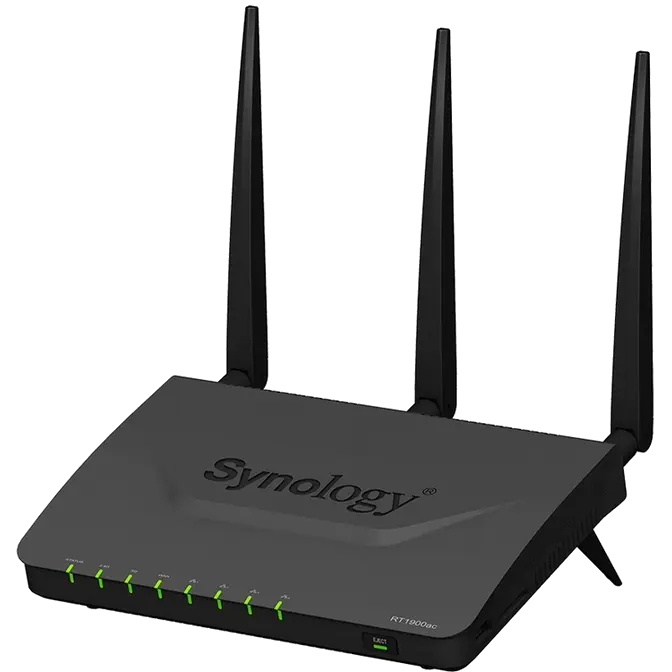
Equipped with three powerful antennas and support for the latest 802.11ac wireless networking standard, Synology Router RT1900ac broadcasts both 2.4 and 5 GHz spectrums for combined data transfer speeds of up to 1900 Mbps . Never worry about speed bottlenecks even when multiple people are connected to the network.
Lag-free online gaming
Take advantage of easy-to-use bandwidth prioritization and network traffic controls, so your games always get the speed and low latency they need.
Smooth video streaming
Enjoy buffer-free playback when streaming 4K movies from your favorite online video service, or play home videos stored on external storage directly on a DLNA compatible TV or media player.
Fast file transfers
Share important files and documents quickly and smoothly when collaborating with business partners or others.
Robust connectivity with Beamforming
Traditional routers broadcast wireless signals in all directions, regardless of the position of your laptop or smartphone. With smart Beamforming technology, Synology Router RT1900ac focuses wireless signals toward up to six supported devices, reducing latency, economizing power consumption, and improving wireless range.
Game-changing software experience
Synology Router Manager (SRM) is the operating system that powers the Synology Router RT1900ac. With the friendly interface, it makes managing your network and Wi-Fi settings super simple, while delivering robust tools for power users and professionals.
Quick and easy setup
When first setting up Synology Routers RT1900ac, simply plug it into your existing ISP modem, enter "router.synology.com" in a web browser, and follow the interactive installation guide to finish. You can also install DS router to find and complete setup using your Android or iOS device.
Advanced management tools
Synology Router Manager (SRM) includes advanced traffic tools that surpass the common router. With the Network Center application, you can limit bandwidth consumption, block malicious content, and fine-tune how data travels through your home or office network.
Application Layer QoS
Powered by a deep packet inspection engine, Application Layer QoS (Quality of Service) lets you see how much bandwidth is consumed by individual applications and devices. If someone is hogging too much bandwidth on non-essential applications — like YouTube or Spotify — you can restrict the amount of bandwidth the device can use for the specific application, without affecting the bandwidth available for other applications.
Parental Controls
For parents or business owners, you can easily set a schedule to control when children or employees are allowed to access the Internet. In addition, with a vast database of dangerous or inappropriate websites built into SRM, you can customize what kinds of content is permitted and effectively block thousands of sites with a few simple clicks.
Intelligent web filtering
Whereas traditional routers implement URL-based web filtering to block or allow specific content in the network, Synology Router Manager includes a more intelligent web filtering which checks if content is blocked or allowed during the DNS lookup stage of communication, making it harder to sneak through and see unauthorized content, while also reducing system resource consumption.
VPN support, RADIUS server, and other possibilities
Go beyond a simple router with a rich selection of add-on software packages available on Synology's Package Center. Transform your Synology Router RT1900ac into a personal VPN server, professional RADIUS authentication server, 24/7 download hub, multimedia library, or add other handy features for use at home or the office. Learn more
Take your files everywhere
By connecting a USB storage drive or SD (SDXC) card to Synology Router RT1900ac, you can access the contents from anywhere or share files with family and coworkers. Support for all popular file protocols — like SMB, AFP, FTP, or WebDAV — means Synology Router RT1900ac plays nice with Windows and Mac computers, as well as Android and iOS devices.
Anywhere access with QuickConnect
Synology's free QuickConnect service is the simplest way to access your Synology Router RT1900ac, even when you’re away from home or the office. Just register a unique and customizable QuickConnect ID, and you’ll to be able to log in to Synology Router Manager, access connected storage devices, and do much more from anywhere with an Internet connection.
Tap, swipe, and manage everything
Install the DS router on your Android or iOS device and conveniently manage settings on Synology Router RT1900ac from the palm of your hand. DS router delivers robust tools and options, such as easy installation, wireless network management, real-time traffic monitoring and controls, as well as much more.
DS Router


Go mobile with 3G/4G (LTE)
Simply plug in a 3G/4G (LTE) USB modem and create a mobile broadband hotspot for all your devices. This is especially useful for establishing wi-fi connectivity in vehicles, remote locations, or regions with poor wired Internet infrastructure.