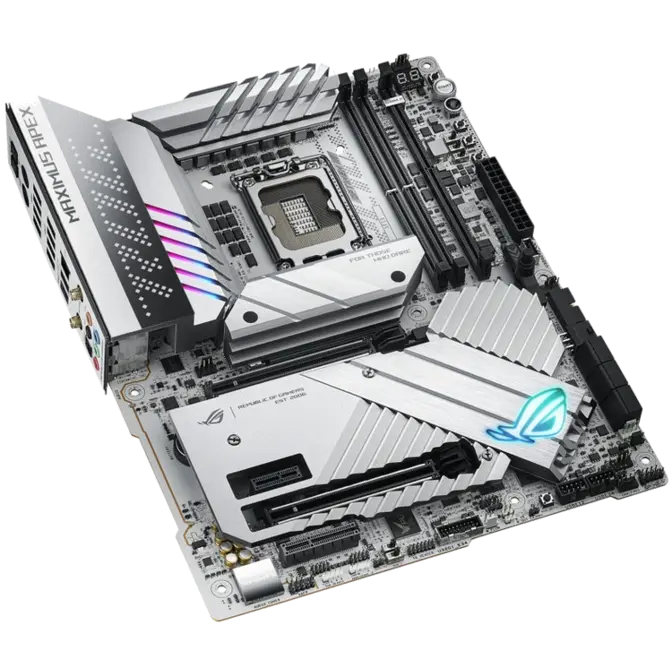
ASUS ATX ROG MAXIMUS Z790 APEX DDR5 Motherboard

PN: ROG MAXIMUS Z790 APEX

This product is no longer avaliable.

See suggested alternative models below.

Suggested Products

CPU Socket:Intel S1700For 12th/13th Gen Processors (Requires BIOS update for 14th Gen Compatibility)
Form Factor:ATX
Chipset:Intel Z790 Chipset
Compatible Memory:DDR52 x DIMM Sockets
Wi-Fi:Wi-Fi 6E (802.11ax)Bluetooth v5.3
PCIe Sockets:2 x PCIe 5.0 x161 x PCIe 4.0 x41 x PCIe 4.0 x1
M.2 Sockets:2 x M.2 PCIe 4.0 on motherboard + 2x M.2 PCIe 4.0 via included ROG DIMM.2 with Heatsink + 1 x M.2 PCIe 5.0 via included PCIe 5.0 M.2 Card with Heatsink
SATA Ports:6 x SATA 6Gb/s
RAID Support:0, 1, 5, 10
Ethernet Port:RJ45 (Intel 2.5Gb)
Audio Ports:5 x 3.5mm (7.1)Optical S/PDIF-Out
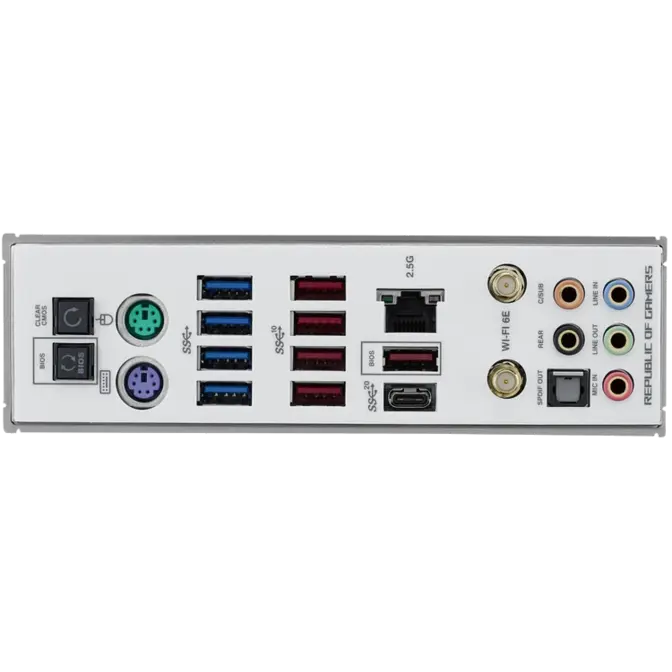
Rear USB Ports:1 x USB 3.2 Gen 2×2 Type-C5x USB 3.2 Gen2 Type-A4x USB3.2 Gen1 Type-A
Internal USB Ports:1 x USB 3.2 Gen 2×2 Type-C2 x USB 3.2 Gen 1 Header2 x USB 2.0 Headers

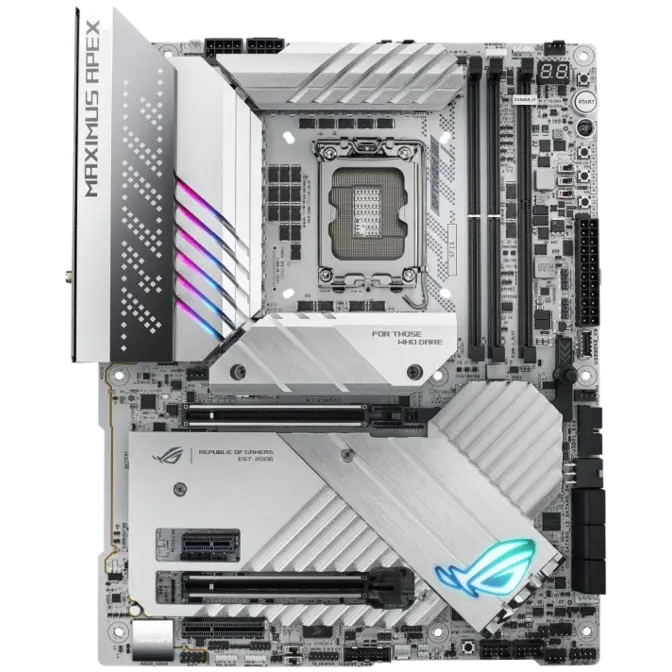
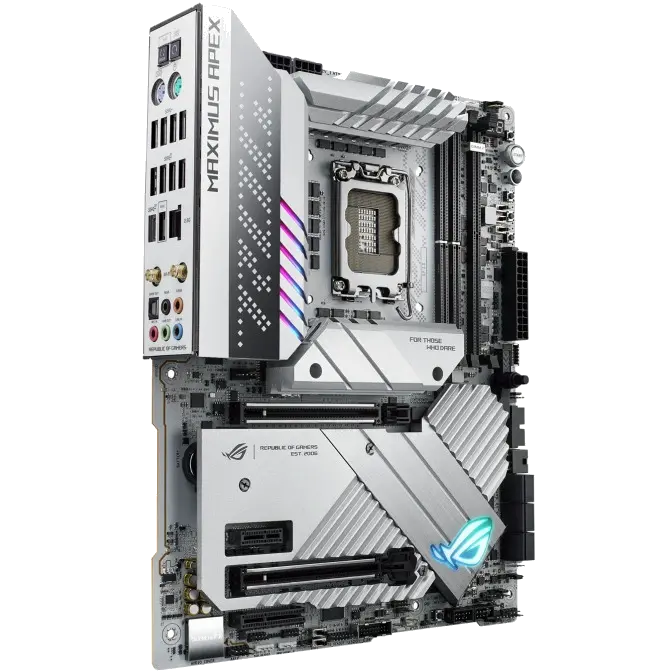
Intel Z790 LGA 1700 ATX motherboard with 24 + 0 power stages, DDR5 memory support, five M.2 slots, PCIe 5.0 M.2 Card with a PCIe 5.0 NVMe SSD slot, two PCIe 5.0 x16 SafeSlots, PCIe slot Q-Release, WiFi 6E, USB 3.2 Gen 2×2 Type-C rear I/O port and additional front-panel connector with Quick Charge 4+ up to 60W, AI Overclocking, AI Cooling II, and Aura Sync RGB lighting.
 

ASUS ROG MAXIMUS Z790 APEX LGA 1700 ATX Motherboard - Desktop Overview 1

ROG MAXIMUS Z790 APEX

A relentless focus on overclocking makes the Maximus Apex Z790 a dream for upper-echelon enthusiasts. Bountiful power delivery and similarly capable cooling stack the odds in your favour for reaching 6 GHz and higher with the latest 13th Gen Intel Core Processors. PCB trace optimisations allow DDR5 memory to strut timings and frequencies far beyond the capabilities of 4-DIMM-slot designs. A plethora of quality-of-life features and controls afforded by onboard components and software utilities make it all readily accessible for users of all stripes. Get ready for the highest performance numbers… ever.


ASUS ROG MAXIMUS Z790 APEX LGA 1700 ATX Motherboard - Desktop Overview 2

Peak Performance

1 – DUAL PROCOOL II POWER CONNECTORS

2 – 24 + 0 POWER STAGES

3 – EXPANSION SLOTS
2x PCIe 5.0 x16 SafeSlots [CPU]
1x PCIe 4.0 x4 Slot [Chipset]
1x PCIe 4.0 x1 Slot [Chipset]

4 – INTEL SOCKET LGA1700
For 13th Gen Intel Core Processors and 12th Gen Intel Core, Pentium Gold, and Celeron Processors

5 – DDR5 8000+ MT/s (OC)
2x DIMM
Dual Channel

6 – M.2 Slots
2x M.2 2242-2280 (PCIe 4.0 x4)
1x M.2 2242-22110 (PCIe 5.0 x4) (via PCIe 5.0 M.2 Card)
2x M.2 2242-22110 (PCIe 4.0 x4) (via ROG DIMM.2 Card)


ASUS ROG MAXIMUS Z790 APEX LGA 1700 ATX Motherboard - Desktop Overview 3

OVERCLOCKING

ROG Maximus Apex boards are well-known as a record-setting platform for overclocking enthusiasts. From OC-centric components and design choices, to a massive power delivery system, the beast is back to rock new world records in multiple domains.

AI OVERCLOCKING

Tuning is now faster and smarter than ever before. ASUS AI Overclocking profiles the CPU and cooling to predict the optimal configuration and push the system to its limits. Predicted values can be engaged automatically or used as a launching ground for further experimentation.

MEMORY

Comprehensive memory tuning options are a cornerstone of ROG motherboards. With the ROG Maximus Z790 Apex, you can extract maximum potential out of the highest-performing DDR5 modules.


COOLING

Massive heatsinks cover the Z790 Apex from top to bottom and across both M.2 expansion cards, giving critical components ample thermal headroom to realise their true potential.

ASUS ROG MAXIMUS Z790 APEX LGA 1700 ATX Motherboard - Desktop Overview 4

HEATSINKS

1 – VRM HEATSINK ARRAY
VRM heatsinks on the MOSFETs and chokes are connected by an embedded heatpipe to increase mass and surface area for dissipation.

2 – M.2 HEATSINKS AND BACKPLATES
Both onboard M.2 slots are thoroughly cooled with heatsinks and backplates for maximum cooling performance.

3 – PCIE 5.0 M.2 CARD HEATSINK
The bundled PCIe 5.0 M.2 card wraps its slot in a massive heatsink to ensure adequate cooling for the most performant drives.

4 – EXTENDED VRM AND M.2 HEATSINK
An extended heatsink helps further cool the VRM along with an M.2 drive.

5 – ROG DIMM.2 CARD HEATSINK
Two additional M.2 slots are kept cool with the DIMM.2 card's hefty heatsinks.


CONNECTIVITY

As the Maximus moniker implies, the Z790 Apex is fully equipped with the latest storage, networking, and audio features.

ASUS ROG MAXIMUS Z790 APEX LGA 1700 ATX Motherboard - Desktop Overview 5.1

PCIE 5.0

Fully embracing the new standard, the ROG Maximus Z790 Apex offers abundant Gen 5 support to give unfettered bandwidth to the fastest SSDs and graphics cards available.

USB 3.2 GEN 2×2

ROG Maximus Z790 Apex comes loaded with two USB 3.2 Gen 2×2 Type-C connectors for speedy data transfers up to 20 Gbps. One is a port on the rear I/O; the other can be attached to the chassis front panel and it also features Quick Charge 4+ technology to quickly charge devices at up to 60W*.

*Requires a PCIe power supply cable to be plugged into the nearby 6-pin connector.

ASUS ROG MAXIMUS Z790 APEX LGA 1700 ATX Motherboard - Desktop Overview 5.2

WIFI 6E

Onboard WiFi 6E technology takes advantage of newly available spectrum in the 6 GHz band to provide up to seven 160 MHz channels for ultrafast throughput and better performance in dense wireless environments.

2.5G ETHERNET

Low-latency gaming, speedy file transfers, and high-resolution video streaming are among the many perks of onboard Intel 2.5 Gbps Ethernet.

*WiFi 6E availability and features are dependent on regulatory limitations and co-existence with 5 GHz WiFi.


ASUS ROG MAXIMUS Z790 APEX LGA 1700 ATX Motherboard - Desktop Overview 6

OPTIMISATION

A bevy of innovative tools offers control over every aspect of your system.

AI Cooling II

Balance the thermals and acoustics of any build with a single click. A proprietary ASUS algorithm slashes unnecessary noise while running a quick stress test, and then monitors CPU temperatures to dynamically adjust fans to optimal speeds.


ASUS ROG MAXIMUS Z790 APEX LGA 1700 ATX Motherboard - Desktop Overview 7

PERSONALISATION

The Z790 Apex keeps its iconic cross-board slash, but brings a new silver and white colour scheme to the Maximus lineup. Onboard components contrast beautifully against a white PCB, and a tasteful touch of RGB on the shroud and chipset heatsink brings customisable colour into the mix.

GROW YOUR GAMING WORLD

ROG motherboards feature ASUS Aura technology, enabling full lighting control and a variety of presets for both onboard RGB LEDs and third-party accessories. Effects can be easily synced across compatible ROG graphics cards, monitors, keyboards, and mice to give your setup a unified look. 

CPU

Intel® Socket LGA1700 for 13th Gen Intel® Core™ Processors & 12th Gen Intel® Core™, Pentium® Gold and Celeron® Processors*
Supports Intel® Turbo Boost Technology 2.0 and Intel® Turbo Boost Max Technology 3.0**
* Refer to www.asus.com for CPU support list.
** Intel® Turbo Boost Max Technology 3.0 support depends on the CPU types.

Chipset

Intel® Z790 Chipset

Memory

2 x DIMM, Max. 96GB, DDR5 8000+(OC)/7800(OC)/7600 (OC)/7467(OC)/7200(OC)/7000(OC)/6800(OC)/6600(OC)/6400(OC)/ 6200(OC)/ 6000(OC)/ 5800(OC)/ 5600/ 5400/ 5200/ 5000/ 4800 Non-ECC, Un-buffered Memory*
Dual Channel Memory Architecture
Supports Intel® Extreme Memory Profile (XMP)
OptiMem III
* Supported memory types, data rate (Speed), and number of DRAM modules vary depending on the CPU and memory configuration, for more information refer to www.asus.com for memory support list.

Expansion Slots

Intel® 13th & 12th Gen Processors*
2 x PCIe 5.0 x16 slots (supports x16 or x8/x8 modes)**

Intel® Z790 Chipset
1 x PCIe 4.0x4 slot
1 x PCIe 4.0x1 slot
* Please check the PCIe bifurcation table on the support site (https://www.asus.com/support/FAQ/1037507/).
** When the PCIE 5.0 M.2 card is installed on the PCIEX16(G5)_2, PCIEX16(G5)_1 will run x8 only.
- To ensure compatibility of the device installed, please refer to https://www.asus.com/support/ for the list of supported peripherals.

Storage

Total supports 5 x M.2 slots and 6 x SATA 6Gb/s ports*
Intel® 13th & 12th Gen Processors
M.2_1 slot (Key M), type 2242/2260/2280 (supports PCIe 4.0 x4 mode)
PCIe 5.0 M.2 slot (Key M) via PCIe 5.0 M.2 card, type 2242/2260/2280/22110

Intel® Z790 Chipset**
M.2_2 slot (Key M), type 2242/2260/2280 (supports PCIe 4.0 x4 & SATA modes)
DIMM.2_1 slot (Key M) via ROG DIMM.2, type 2242/2260/2280/22110 (supports PCIe 4.0 x4 mode)
DIMM.2_2 slot (Key M) via ROG DIMM.2, type 2242/2260/2280/22110 (supports PCIe 4.0 x4 mode)
6 x SATA 6Gb/s ports**
* Intel® Rapid Storage Technology supports PCIe RAID 0/1/5/10, SATA RAID 0/1/5/10
** RAID configuration and boot drives are not supported on the SATA6G_E1-2 ports.

Ethernet

1 x Intel® 2.5Gb Ethernet
ASUS LANGuard

Wireless & Bluetooth

Wi-Fi 6E
2x2 Wi-Fi 6E (802.11 a/b/g/n/ac/ax)
Supports 2.4/5/6GHz frequency band*
Bluetooth® v5.3**
* WiFi 6E 6GHz regulatory may vary between countries.
** The Bluetooth version may vary, please refer to the Wi-Fi module manufacturer's website for the latest specifications.

USB

Rear USB (Total 10 ports)
1 x USB 3.2 Gen 2x2 port (1 x USB Type-C®)
5 x USB 3.2 Gen 2 ports (5 x Type-A)
4 x USB 3.2 Gen 1 ports (4 x Type-A)

Front USB (Total 9 ports)
1 x USB 3.2 Gen 2x2 connector (supports USB Type-C® with up to 60W PD/QC4+)
2 x USB 3.2 Gen 1 headers support additional 4 USB 3.2 Gen 1 ports
2 x USB 2.0 headers support additional 4 USB 2.0 ports

Audio

ROG SupremeFX 7.1 Surround Sound High Definition Audio CODEC ALC4080
- Impedance sense for front and rear headphone outputs
- Supports: Jack-detection, Multi-streaming, Front Panel Jack-retasking
- High quality 120 dB SNR stereo playback output and 113 dB SNR recording input
- Supports up to 32-Bit/384 kHz playback on front panel

Audio Features
- SupremeFX Shielding Technology
- Savitech SV3H712 AMP  
- Gold-plated audio jacks
- Rear optical S/PDIF out port
- Premium audio capacitors
- Audio cover

Back Panel I/O Ports

1 x USB 3.2 Gen 2x2 port (1 x USB Type-C®)
5 x USB 3.2 Gen 2 ports (5 x Type-A)
4 x USB 3.2 Gen 1 ports (4 x Type-A)
1 x Wi-Fi Module
1 x Intel® 2.5Gb Ethernet port
5 x Gold-plated audio jacks*
1 x Optical S/PDIF out port
1 x BIOS FlashBack™  button
1 x Clear CMOS button
1 x PS/2 Keyboard (purple) port
1 x PS/2 Mouse (green) port
*The rear panel Lime (Line out) port does not support spatial audio. If you wish to use spatial audio make sure to connect your audio output device to the audio jack on the front panel of your chassis.

Internal I/O Connectors

Fan and Cooling related
1 x 4-pin CPU Fan header
1 x 4-pin CPU OPT Fan header
1 x 4-pin AIO Pump header
3 x 4-pin Chassis Fan headers
2 x 4-pin Full Speed Fan headers
1 x W_PUMP+ header
1 x 2-pin Water In header
1 x 2-pin Water Out header
1 x 3-pin Water Flow header

Power related
1 x 24-pin Main Power connector
2 x 8-pin +12V Power connector
1 x 6-pin PCIe Power connector

Storage related
2 x M.2 slots (Key M)
1 x DIMM.2 slot supports 2 x M.2 slots (Key M)
6 x SATA 6Gb/s ports

USB
1 x USB 3.2 Gen 2x2 connector (supports USB Type-C® )
2 x USB 3.2 Gen 1 headers support 4 additional USB 3.2 Gen 1 ports
2 x USB 2.0 headers support 4 additional USB 2.0 ports

Miscellaneous
1 x 80 Light Bar jumper
3 x Addressable Gen 2 headers
1 x Aura RGB header
2 x BCLK button
1 x BIOS Switch button
1 x FlexKey button
1 x Front Panel Audio header (AAFP)
1 x LN2 Mode jumper
1 x Osc sense header
1 x Pause switch
12 x ProbeIt Measurement Points
1 x ReTry button
2 x RSVD switches
1 x RSVD header
1 x Safe Boot button
1 x Slow Mode switch
1 x Start button
1 x V_Latch switch
1 x 10⁻¹ pin System Panel header
1 x Thunderbolt™ (USB4®) header
1 x Thermal Sensor header

Special Features

Extreme OC Kit
- FlexKey button
- LN2 Mode
- ProbeIt
- ReTry button
- Safe boot button
- Start button
- Slow Mode

Extreme Engine Digi+
-SMD Capacitor
- MicroFine Alloy Choke

ASUS Q-Design
- M.2 Q-Latch
- PCIe Slot Q-Release
- Q-Code
- Q-Connector
- Q-LED (CPU [red], DRAM [yellow], VGA [white], Boot Device [yellow green])
- Q-Slot

ASUS Thermal Solution
- M.2 heatsink backplate
- M.2 heatsink
- VRM heatsink design

ASUS EZ DIY
- BIOS FlashBack™ button
- Clear CMOS button
- CPU Socket lever protector
- ProCool II
- Pre-mounted I/O shield
- SafeSlot
- SafeDIMM

Aura Sync
- Aura RGB header(s)
- Addressable Gen 2 header(s)

Dual BIOS

Front Panel USB 3.2 Gen 2x2 with Quick Charge 4+ Support
- Support: up to 60W charging*
- Output: 5/9/15/20V max. 3A, PPS:3.3–21V max. 3A
- Compatible with PD3.0 and PPS
* To support 60W, please install the power cable to the 6-pin PCIe power connector or else only 27W will be supported.

Software Features

ROG Exclusive Software
- GameFirst VI
- ROG CPU-Z
- Sonic Studio III + Sonic Studio Virtual Mixer + Sonic Suite Companion
- Sonic Radar III
- DTS® Sound Unbound
- BullGuard or equivalent internet security (1-year full version)

ASUS Exclusive Software
Armoury Crate
- AIDA64 Extreme (1 year full version)
- Aura Creator
- Aura Sync
- Fan Xpert 4 (with AI Cooling II)
- Power Saving
- Two-Way AI Noise Cancellation
AI Suite 3
- Easy Optimization with AI Overclocking
- TPU
- DIGI+ Power Control
- Turbo app
- PC Cleaner
MyAsus
WinRAR

UEFI BIOS
AI Overclocking Guide
ASUS EZ DIY
- ASUS CrashFree BIOS 3
- ASUS EZ Flash 3
- ASUS UEFI BIOS EZ Mode
MemTest86

BIOS

2 x 256 Mb Flash ROM, UEFI AMI BIOS

Manageability

WOL by PME, PXE

Accessories

ROG DIMM.2 with Heatsink
1 x ROG DIMM.2 with heatsink
1 x M.2 pad for ROG DIMM.2
2 x M.2 screw package for ROG DIMM.2

PCIe 5.0 M.2 Card with Heatsink
1 x PCIe 5.0 M.2 Card with heatsink
1 x M.2 screw package for ROG PCIe 5.0 M.2 Card

Additional Cooling Kit
1 x Thermal pad for M.2
1 x DDR5 Fan holder
1 x DDR5 Fan
1 x DDR5 Fan screw

Miscellaneous
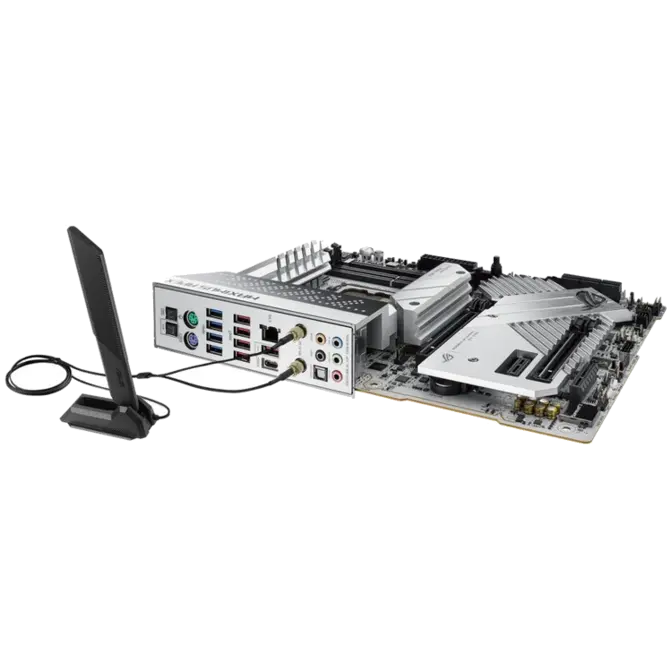
1 x ASUS Wi-Fi moving antennas
1 x Q-connector
1 x ROG overclocking medal
1 x ROG thank you card
2 x M.2 Q-Latch packages for M.2 backplate
2 x M.2 backplate Rubber Packages

Installation Media
1 x USB drive with utilities and drivers

Operating System

Windows® 11, Windows® 10 64-bit

Form Factor

ATX Form Factor
12 inch x 9.6 inch ( 30.5 cm x 24.4 cm )

Warranty Information


3 Year

Manufacturers Warranty

Image Of A Computer Alliance Staff

Tech help, without the jargon.

Need a hand with something tech related? Our team put the human lingo in technology. Simply give us a call and we’ll be more than happy to assist!

Recently Viewed

Select Wishlist

Shopping Cart

Estimate Shipping (enter postcode)

Product Help Form

Product - ASUS ATX ROG MAXIMUS Z790 APEX DDR5 Motherboard