

-

#1 UHD monitor brand in the U.S. for 3 years in a row*
-

CES 2020 Innovation Awards Honoree in Computer Peripherals & Accessories
*The NPD Group, Inc., U.S. Weekly Retail Tracking Service, Monitors, Display Resolution: 3840 x 2160, Based on Dollars, 52 Weeks Ending Apr 4, 2020 vs. same weeks in 2018 & 2019.

Designed around you
Boost your productivity with new innovations for ergonomics and workplace.
-
Exceptional Image Quality
3840 x 2160 UHD 4K IPS
DCI-P3 95% (Typ.) & HDR10 -
Ergonomics
Ergonomic Stand with C-Clamp
Full Movement of Display -
User Convenience
USB Type-C™
Easy Installation
UHD 4K IPS Display
Lifelike realism with IPS and UHD resolution
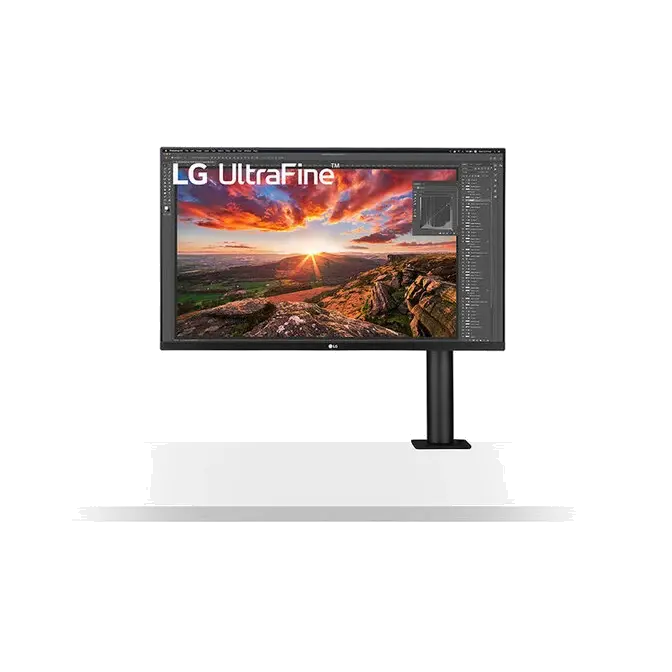
Reimagine everything you do with the IPS Display. At 31.5" and 3840×2160 resolution, LG's UHD IPS Display features realistic, true color, enhanced contrast, clarity and detail at wide angles. See a clearer, lifelike vision of productivity, play and entertainment.


Ergo Design
Next-level ergonomics and efficiency
Experience a comfortable, more flexible desktop setup. Ergo Design brings an innovative, ergonomic arm to fit your needs. Secure the stand, monitor and cables with its C-Clamp, One Click Mount and simple cable management in seconds. Easily adjust the pivot, height and tilt. And work with improved posture and productivity.
Extend / Retract 0~180mm
Swivel ± 280°


Height 0~130mm
Pivot 90°
Tilt ± 25°


*The figures above are the available range of features.
Compatible with every posture
The Ergo is a welcome innovation for anyone who spends a significant amount of time at their desk. LG’s technologically and ergonomically advanced stand helps to promote good posture through its high degree of adjustability, enabling each user to create a perfectly customized workstation.


Clutter-Free Desk Setup
Fully use your desk
Ergo's compact design takes up very little desk surface and also contributes to easier installation. Helping users achieve a clutter-free environment, Ergo’s USB-C One Cable solution conveniently provides fast data transfer and power for laptop charging through a single cable.


*For detailed installation instructions, see the product manual at LG.com Support page.